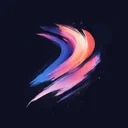

Free Procreate Brushset
Abstract 28
Download Abstract 28 – free Procreate brushset for iPad. Preview the strokes, install the .brushset file and find similar packs.


Premium
“Abstract 28” and 2,732 more sets — in Premium
- 63,691 brushes for Procreate
- Commercial use allowed
- Cancel anytime
from ₽165 (≈ €1.74) per month
Get accessWhat you get with Abstract 28
Abstract 28 is a compact abstract brushset for Procreate on iPad, with 6 brushes in one .brushset file.
Working with this pack
Tap the .brushset to load it into Procreate; there is no extra setup, just start drawing. Preview thumbnails show each stroke before you commit. If you want more range, pair it with packs like Abstract 38, Bold Geometric Colour and Abstract 2. Artists have liked Abstract 28 3,500 times, so it is one of the more popular abstract packs here. Abstract 28 is part of the premium collection.
Similar Brushes

Abstract
Abstract 38

Abstract
Bold Geometric Colour

Abstract
Abstract 2

Abstract
Abstract 47

Abstract
Abstract 19

Abstract
Abstract 23

Abstract
Abstract 24

Abstract
Abstract 25

Abstract
Abstract 41

Abstract
Abstract 46

Abstract
Abstract 36

Abstract
Abstract 45
Frequently Asked Questions
Click a question to expand the answer
Is Abstract 28 worth downloading for Procreate on iPad?
How do I install free Procreate brushes (.brushset) on iPad?
Why are my Procreate brushes not importing on iPad?
Can I use Procreate brushes for commercial work and client projects?
What is the fastest way to find and download the right Procreate brush pack?
Premium
“Abstract 28” and 2,732 more sets — in Premium
- 63,691 brushes for Procreate
- Commercial use allowed
- Cancel anytime
from ₽165 (≈ €1.74) per month
Get access